The Wiv.ai platform specializes in FinOps automations while offering robust capabilities to connect with any system providing REST API endpoints. This article demonstrates how the Wiv.ai HTTP step enables integration with external services, allowing organizations to incorporate their essential tools and create cohesive workflow automations within their platform ecosystem

Monday.com Integration Example

To illustrate this capability, we’ll explore a practical use case involving Monday.com integration. Our workflow accomplishes two key operations:
  1. Data Retrieval: Using the HTTP step, we connect to Monday.com’s API to fetch all items from a specific board, giving us comprehensive visibility into our project data.
  2. Data Creation: We then utilize the HTTP step again to write new items back to the Monday.com board, effectively creating a bidirectional data flow between systems.
This seamless connection demonstrates how Wiv.ai can serve as a central orchestration hub, connecting disparate tools into a unified automation workflow.

Prerequisites for Monday.com Integration

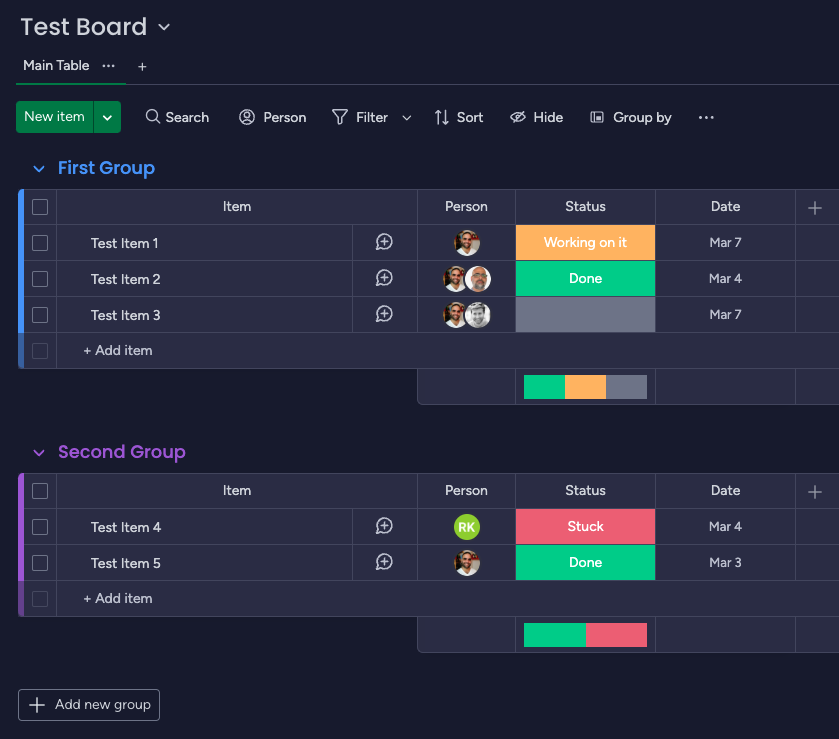
In order for us to achieve this, the first thing we will need is an API key for Monday.com, and a board that we will work on. For our example, we have created a test board that looks like this:
image
Once we configure the board, when we access it, the URL of the board ends with the board ID. Save it for now. 

Creating the REST API workflow

We now prepared to build our first REST workflow:
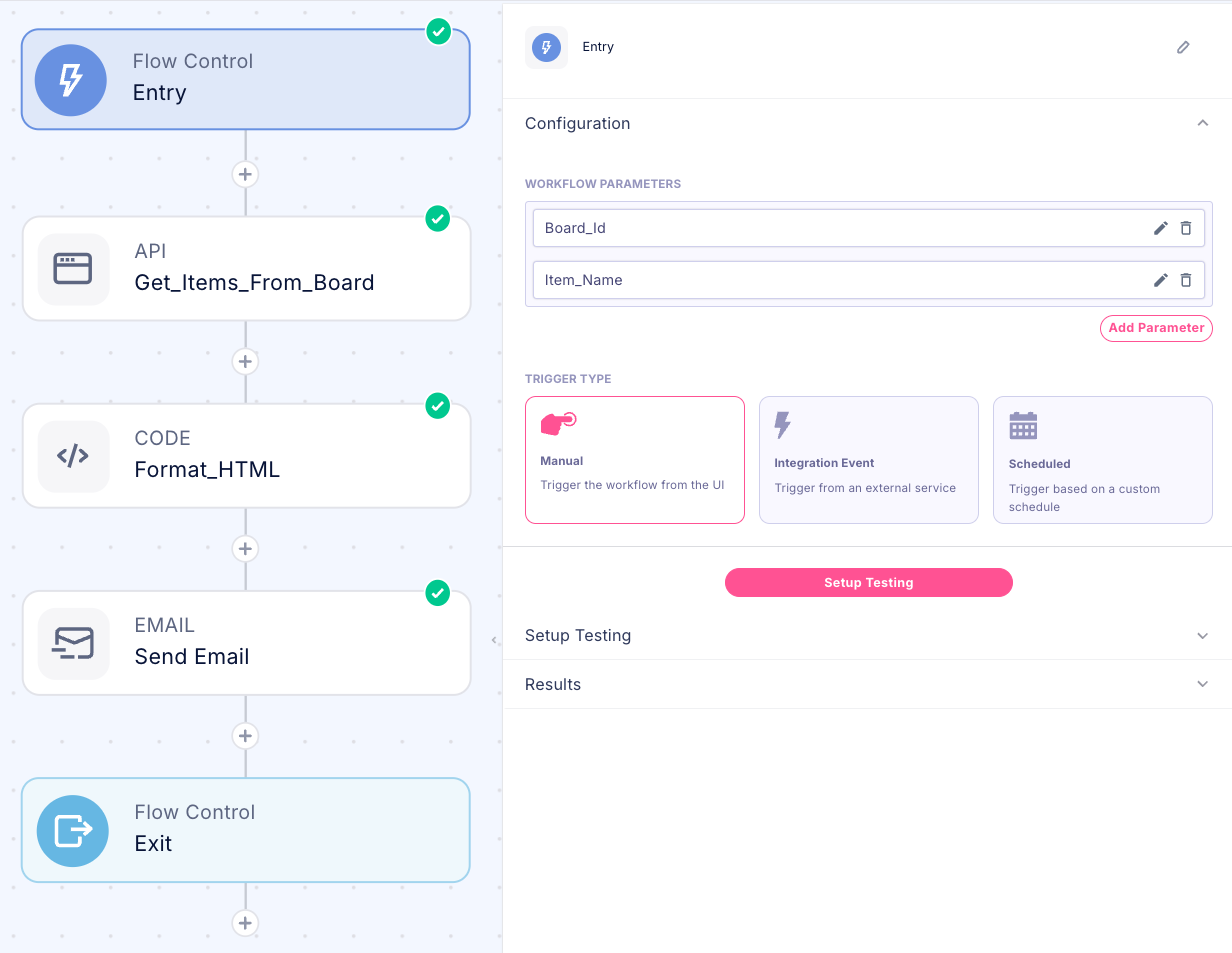
image
Entry Parameters: The workflow accepts the target Monday.com board ID Workflow Structure:
  1. Entry Step: Initializes the workflow and processes the input parameters
  2. HTTP Step: Executes the API calls to Monday.com to retrieve board data
  3. Python Processing: Generates formatted HTML content based on the retrieved data
  4. Email Notification: Sends a comprehensive email containing all items read from the board
This configuration focuses on retrieving and processing existing board data, preparing it for subsequent steps in the automation process (if needed), and export it to email. 

Configuring the REST API for Monday.com

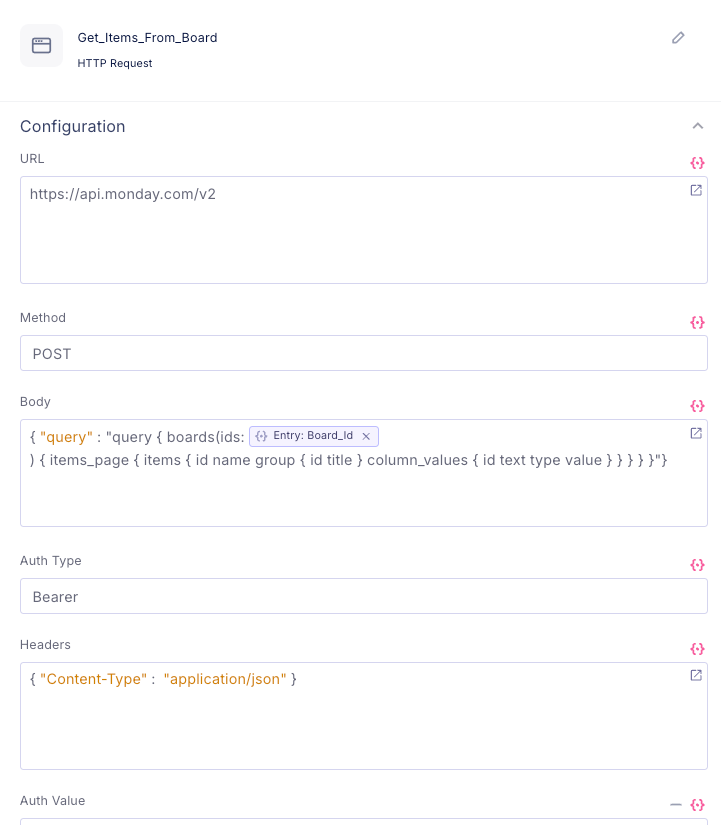
Our HTTP Request requires configuration of several essential fields to properly communicate with the Monday.com API:
  • URL: The specific Monday.com API endpoint we’ll be accessing
  • Method: The HTTP method (POST/GET/etc.) appropriate for our operation
  • Body: The payload data we’re sending to the endpoint
  • Auth Type: Authentication method (Simple/None/Bearer)
    • For Bearer authentication, the Auth Value field will contain our Monday.com API key
  • Headers: Required HTTP request headers for proper API communication
Looking at the Monday.com documentation:
The monday.com API is built with GraphQL, a flexible query language that allows you to return as much or as little data as you need. It's important to know that GraphQL is an application layer that parses the query you send it and returns (or changes) data accordingly.  
  
  
Unlike REST APIs, where multiple endpoints return different data, GraphQL always exposes one endpoint and allows you to determine the structure of the returned data. Our API uses the following endpoint: https://api.monday.com/v2
That means that the URL is the same for any request. 

Reading Items from a board

image
Understanding that the URL and headers are the same, helps us focus on the body query, to retrieve all the items in the board (Board_Id parameter): 
{"query": "query { boards(ids: {{Entry.output.Board_Id}}) { items_page { items { id name group { id title } column_values { id text type value } } } } }"}
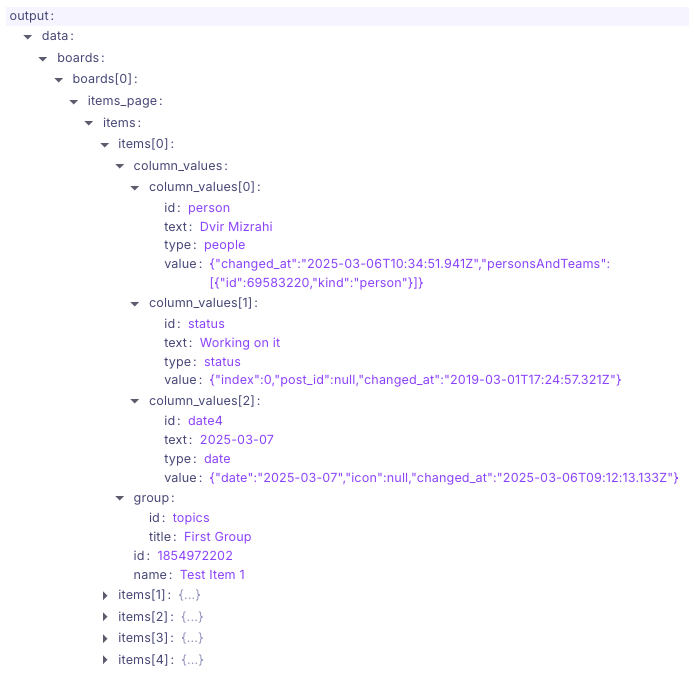
Now that we have our command ready, let’s execute it: 
image
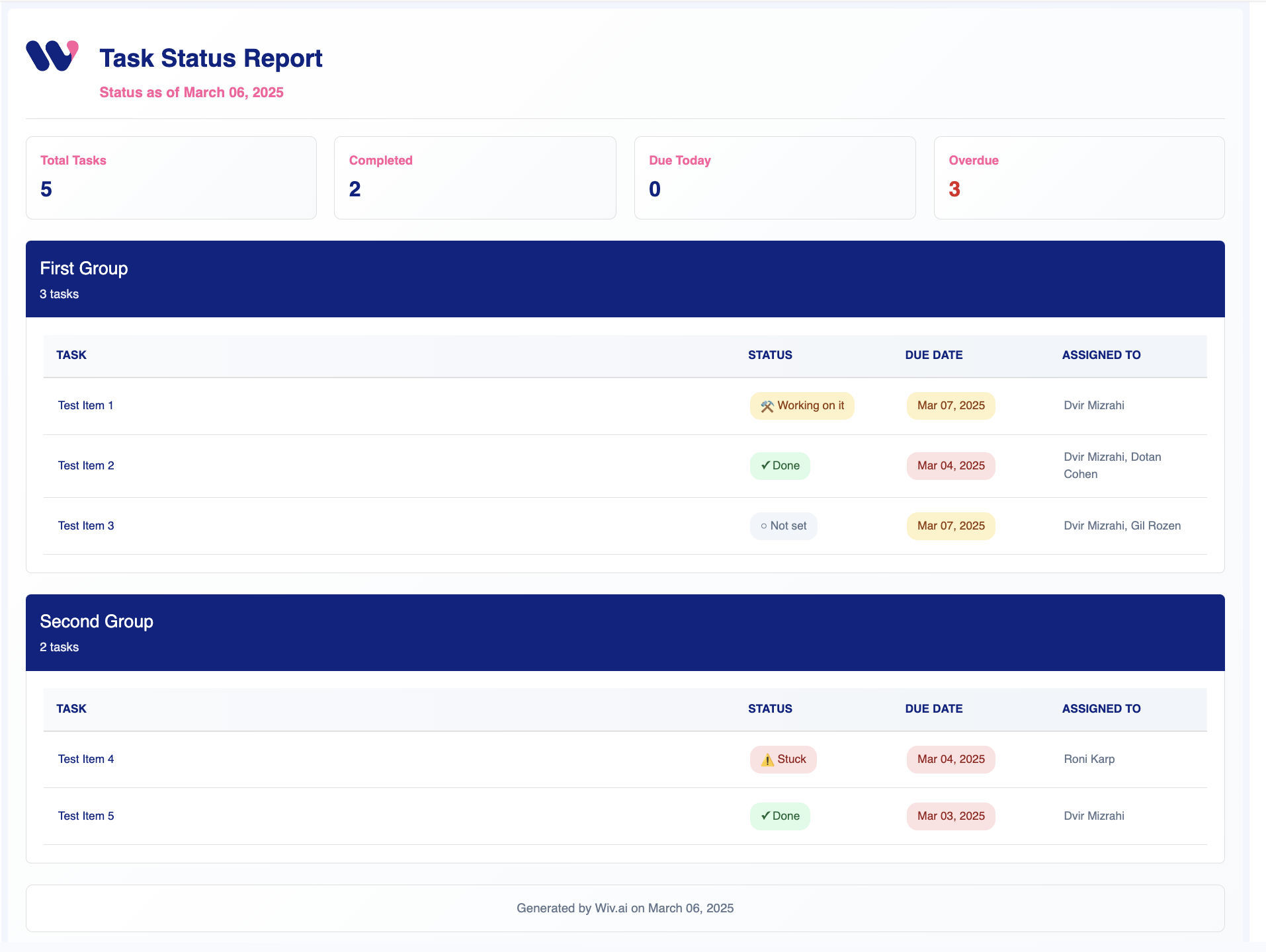
Awesome! we just got our items from Monday using an HTTP request.  Let’s edit them into a beautiful HTML template using Python and AI, and email them as a Wiv report: 
image
or: Let’s convert them to a list, so we’ll be able to take more actions. Using our AI prompt in the Python step, we can now have the following code:
import json  
def flatten_monday_data(json_data):  
    flattened_items = []  
  
    boards = json_data.get('data', {}).get('boards', [])  
    for board in boards:  
        items = board.get('items_page', {}).get('items', [])  
  
        for item in items:  
            flat_item = {  
                'id': item.get('id'),  
                'name': item.get('name'),  
                'group_id': item.get('group', {}).get('id'),  
                'group_title': item.get('group', {}).get('title')  
            }  
  
            # Process column values  
            for column in item.get('column_values', []):  
                column_id = column.get('id')  
                column_text = column.get('text')  
                flat_item[column_id] = column_text  
  
            flattened_items.append(flat_item)  
  
    return flattened_items  
  
  
monday_data = {{Get_Items_From_Board.output}}  
return flatten_monday_data(monday_data)
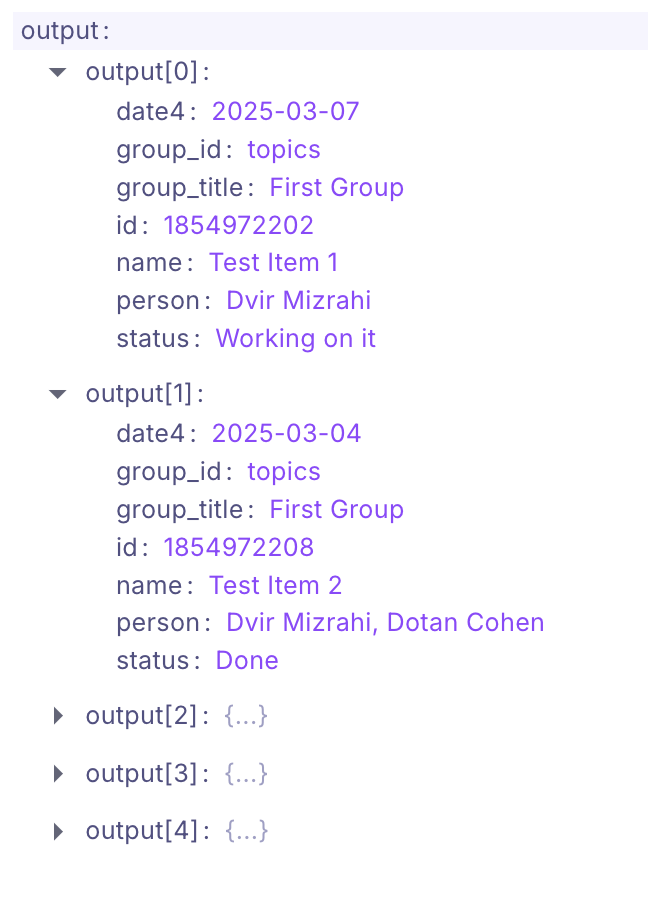
Which produces the following output: 
image

Writing Items to a board

image
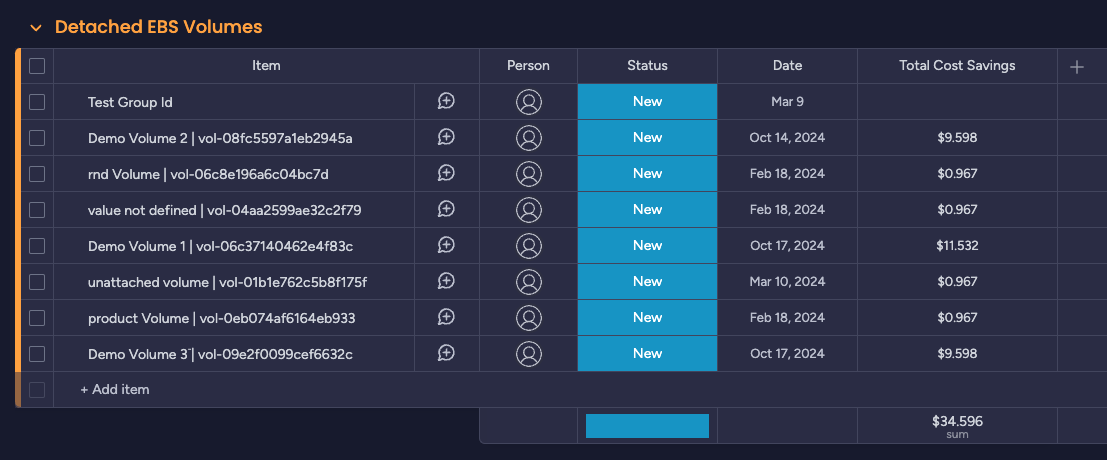
Now, let’s say I want to manage my Wiv.ai optimization cases on Monday.  For this implementation, we will focus on the Detached EBS Volume use case, leveraging Monday.com’s mutation API to create entries in our project board. Each identified detached volume will trigger an API call that:
  1. Creates a new item within a dedicated “Detached EBS” group in our Monday.com board
  2. Populates a custom “Total Cost Savings” Numbers column we’ve added to capture financial impact

This approach allows us to transform technical infrastructure data into actionable business intelligence within our project management workflow.
image
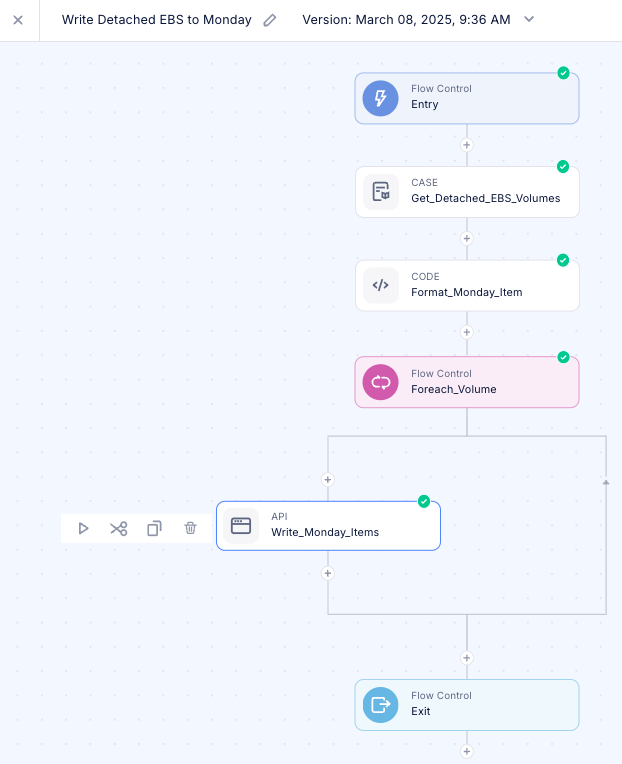
We can see that at the moment, our board is completely empty. Let’s create a simple workflow using our Wiv.ai predefined steps to get the names of the EBS volumes and their total savings. The flow is simple: 
  1. Read the Detached EBS volumes cases
  2. Transform the data to our columns structure
  3. Foreach volume - write the item to our Monday board

Transforming our data using AI

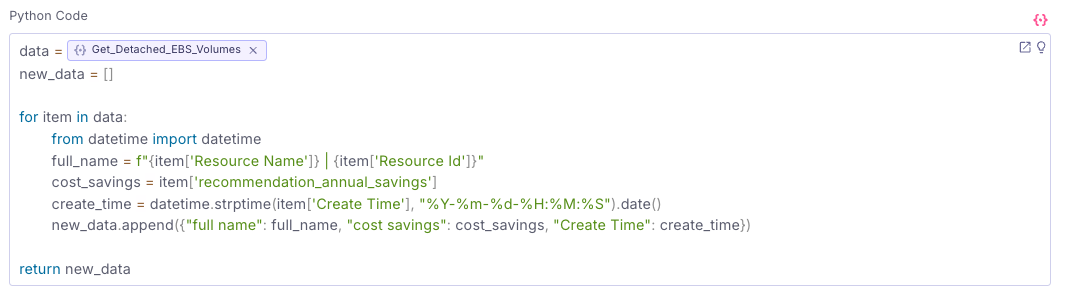
Let’s say the response we got from the EBS volumes cases looks like this: We can work with the current values or we can transform the data using a python step to the relevant format using AI
Let’s copy the data structure to our AI helper in the python step and write the following prompt:
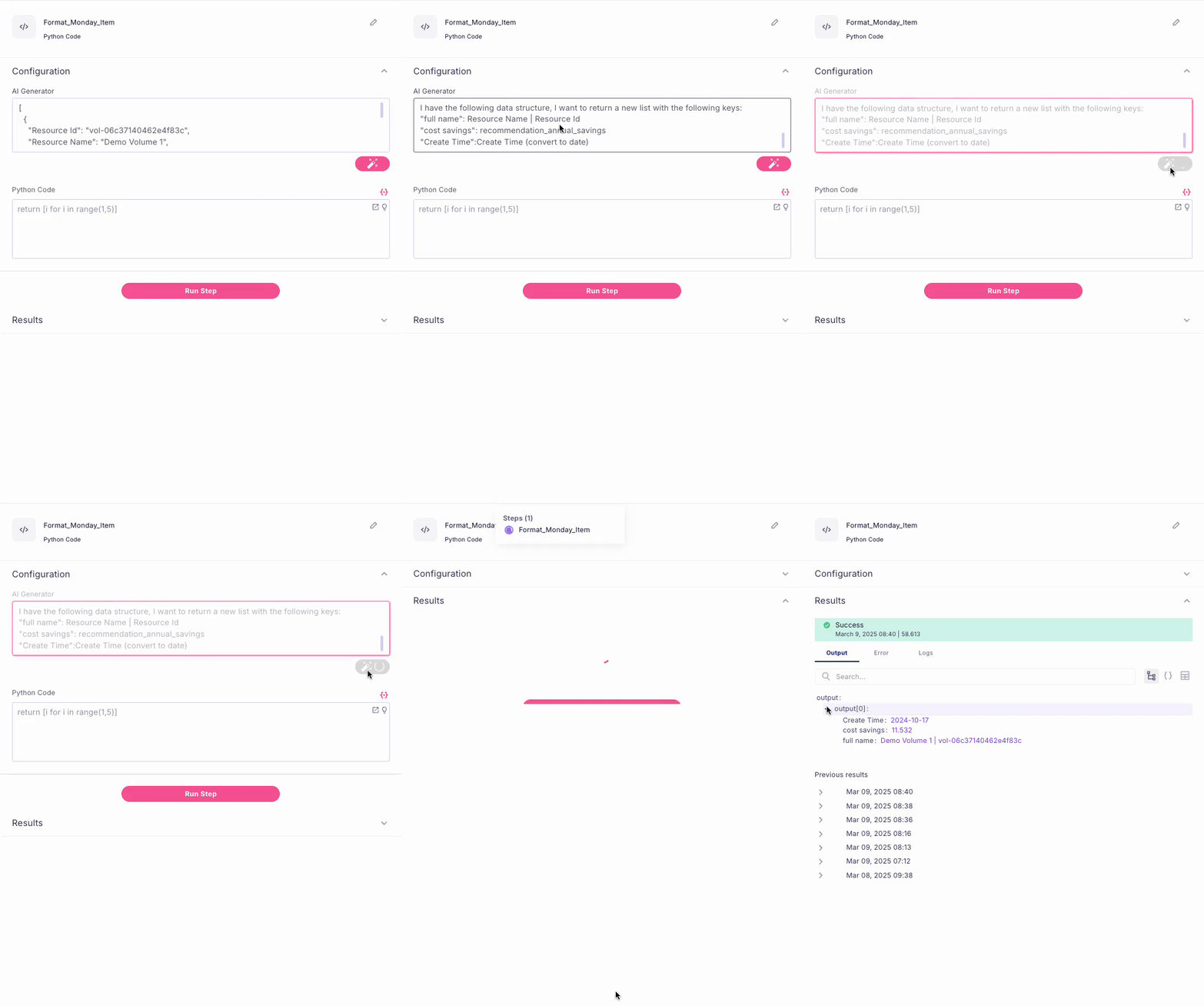
[
  {
    "Resource Id": "vol-06c37140462e4f83c",
    "Resource Name": "Demo Volume 1",
    "Create Time": "2024-10-17-18:57:41",
    "recommendation_annual_savings": 11.532
  }
]
I have the following data structure, I want to return a new list with the following keys: 
"full name": Resource Name | Resource Id
"cost savings": recommendation_annual_savings
"Create Time":Create Time (convert to date) 
image
Now we just need to replace the data with the list from the Detached EBS step’s output to make sure we have all the items
image

Writing the items to Monday

We will implement an iterative approach using the Loop step to process each detached EBS volume case individually. This methodology enables us to write each instance to our Monday.com board systematically and efficiently. The API call structure remains consistent across iterations, allowing us to reuse the step configuration from our previous workflow. Our primary modification will be adjusting the query body to perform data mutation according to Monday.com’s API documentation.

Obtaining the Group ID and the Cost column ID

To properly target our “Detached EBS” group with the newly created Costs column, we first need to identify their unique IDs. While this could be accomplished through a dedicated API calls, we can simplify the process by:
  1. Adding a temporary item to our newly created group
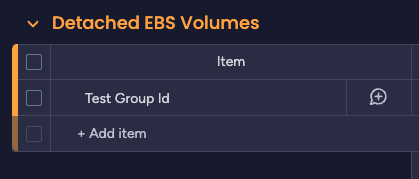
image
  1. Executing our existing “read items” query from the previous workflow step
  2. Extracting the Group ID and the Costs column ID from the response
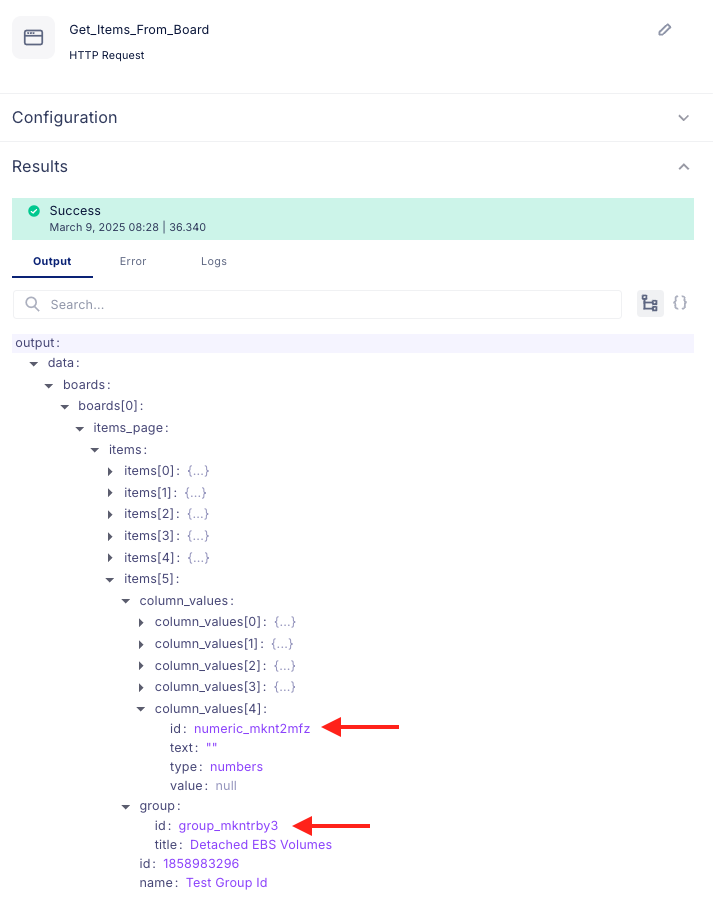
image
This pragmatic approach allows us to obtain the necessary identifier for subsequent write operations without developing additional code. The final step would be to create the HTTP request to populate those items to our newly created board Using the data from the Loop, we can now allocate each column in our board with the value of each item: 
{
  "query": "mutation { create_item (board_id: {{Entry.output.Board_Id}}, group_id: \"group_mkntrby3\", item_name: \"{{Foreach_Volume.output.full name}}\", column_values: \"{\\\"status\\\":{\\\"label\\\":\\\"New\\\"},\\\"date4\\\":{\\\"date\\\":\\\"{{Foreach_Volume.output.Create Time}}\\\"},\\\"numeric_mknt2mfz\\\":{{Foreach_Volume.output.cost savings}}}\") { id name } }"
}
Let’s run the workflow to test our changes! 
image

Conclusion: Unlocking Limitless Automation Possibilities

The Wiv.ai platform stands as a powerful automation solution that enables organizations to create tailor-made workflows aligned with their specific needs. By providing seamless integration with any REST API endpoint and offering cloud-based execution capabilities, Wiv.ai transcends traditional FinOps boundaries to become a truly versatile automation instrument. As demonstrated through our Monday.com integration example, connecting disparate systems and orchestrating complex workflows becomes remarkably straightforward. The platform’s flexibility allows organizations to implement solutions that perfectly complement their:
  • Daily operational requirements
  • Organizational workflows
  • Company culture
  • FinOps maturity level
With Wiv.ai, the constraints of automation are limited only by imagination and strategic approach. By leveraging the platform’s HTTP integration capabilities, teams can build interconnected systems that transform manual processes into streamlined, automated workflows across their entire technology ecosystem.