
Azure Service Principal Onboarding with Billing Analytics
A Complete Guide to Automated Azure Billing Export and AnalysisExecutive Summary
This solution provides automated Azure billing data export and analysis using Azure Synapse Analytics with Managed Identity authentication. It creates a service principal (wiv_account) that handles all authentication without tokens or manual maintenance.
Key Benefits:
- ✅ Zero maintenance - No tokens to renew
- ✅ Automated setup - Single script deployment
- ✅ Cost-effective - Pay only when querying data
- ✅ Cross-subscription support - Centralized billing view
Cost Summary
What Will This Cost Me?
| Company Size | Monthly Cost | Monthly Azure Resources |
|---|---|---|
| Startup | $0.06 | < 100 resources |
| Small Business | $0.50 | 100-500 resources |
| Medium Company | $1.60 | 500-1,000 resources |
| Large Enterprise | $15.50 | 5,000-10,000 resources |
| Very Large | $25-75 | 100,000+ resources (with optimization) |
What Am I Paying For?
- Storage: ~$0.10/month (storing billing data)
- Queries: 1.50/month)
- No hidden costs: No VMs, no licenses, no idle charges
Cost Comparison
- This Solution: 15/month
- Manual Reports: 4 hours × 200/month
- Your Savings: ~$185-195/month
Quick Start Guide
Prerequisites
- Azure subscription with billing access
- Azure CLI installed
- Bash shell (Linux/Mac/WSL)
- Python 3.x (optional, for remote queries)
One-Command Setup
What Gets Created
1. Service Principal (wiv_account)
A secure identity for accessing Azure resources without passwords.
Assigned Roles:
- Cost Management Reader (view billing data)
- Storage Blob Data Reader (access exports)
- Synapse Administrator (manage analytics)
- Monitoring Reader (track usage)
2. Resource Group (wiv-rg)
Container for all billing analytics resources.
3. Storage Accounts
- Billing Export Storage: Stores daily cost data
- Synapse Data Lake: Required for analytics workspace
4. Synapse Workspace (wiv-synapse-billing)
Analytics engine for querying billing data.
5. Billing Export Configuration
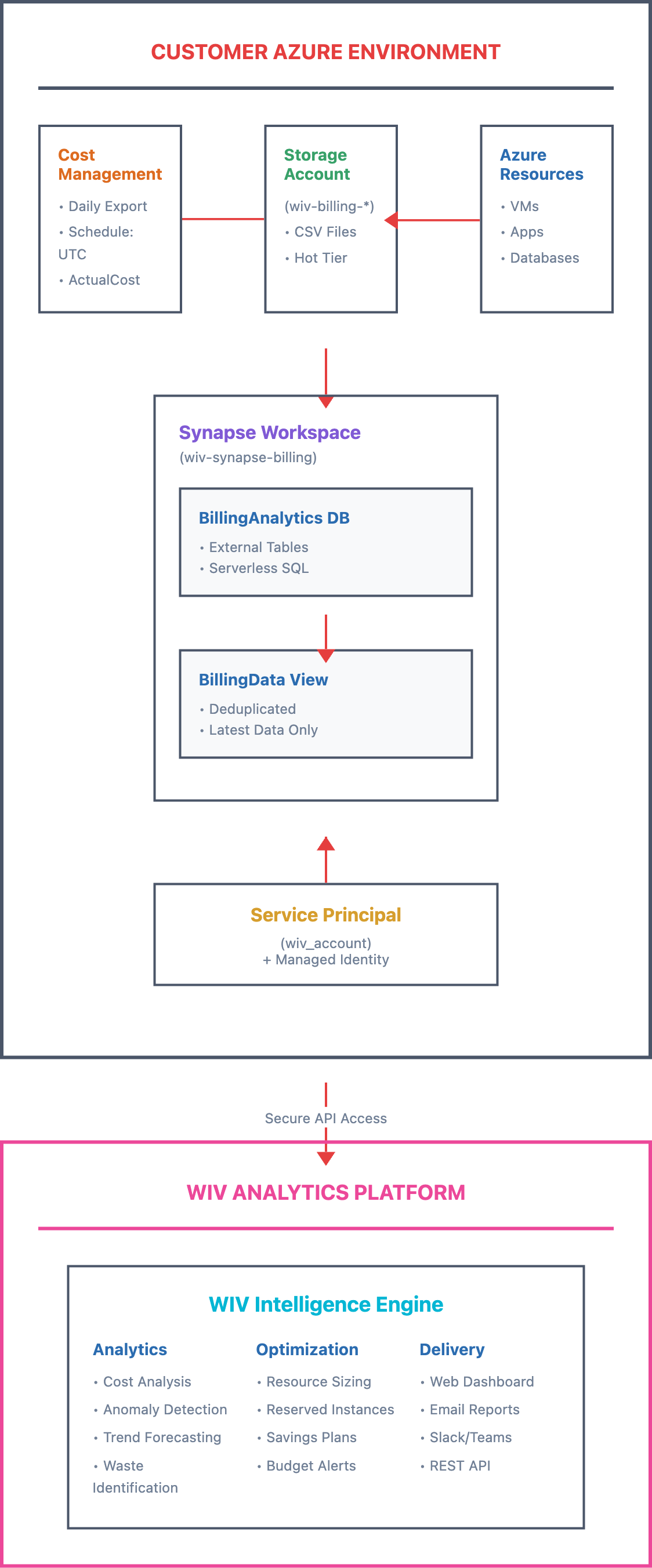
Automated daily export of Azure costs to storage.Architecture Overview
Setup Options
Fresh Setup (Recommended)
Use Existing Billing Export
⚠️ Important Notes
First-Time Setup
- Initial export: Takes 5-30 minutes to appear
- Daily updates: Run at midnight UTC
- Historical data: Available after first export
Data Deduplication
The system automatically handles Azure’s cumulative exports:- Day 1: Contains Day 1 data
- Day 2: Contains Day 1 + Day 2 data
- Solution: Views automatically query only the latest file
Cross-Subscription Access
- ✅ Can read billing from other subscriptions
- ✅ Requires proper permissions
- ✅ Centralized cost analysis
Troubleshooting
Common Issues & Solutions
| Issue | Solution |
|---|---|
| ”Login failed” | Wait 2-3 minutes for permissions to propagate |
| ”No data found” | Wait for first export (5-30 minutes) |
| “Access denied” | Re-run script, it will fix permissions |
| ”Lock conflict” | Script auto-retries 10 times |