
General CLI Command Capabilities
Integration and Authentication
- Setup Requirements
- Choose your AWS integration (typically set up per payer account)
- Wiv allows all linked accounts to use the same integration, unlike other no-code platforms
- Secure access through assume role with external ID authentication
- Optional account ID specification for non-payer account operations
- Key Features
- Direct AWS CLI command execution within workflows
- AI-powered assistance for command generation and optimization
- Built-in error handling and troubleshooting capabilities
- Seamless integration with existing AWS services
- Important Considerations
-
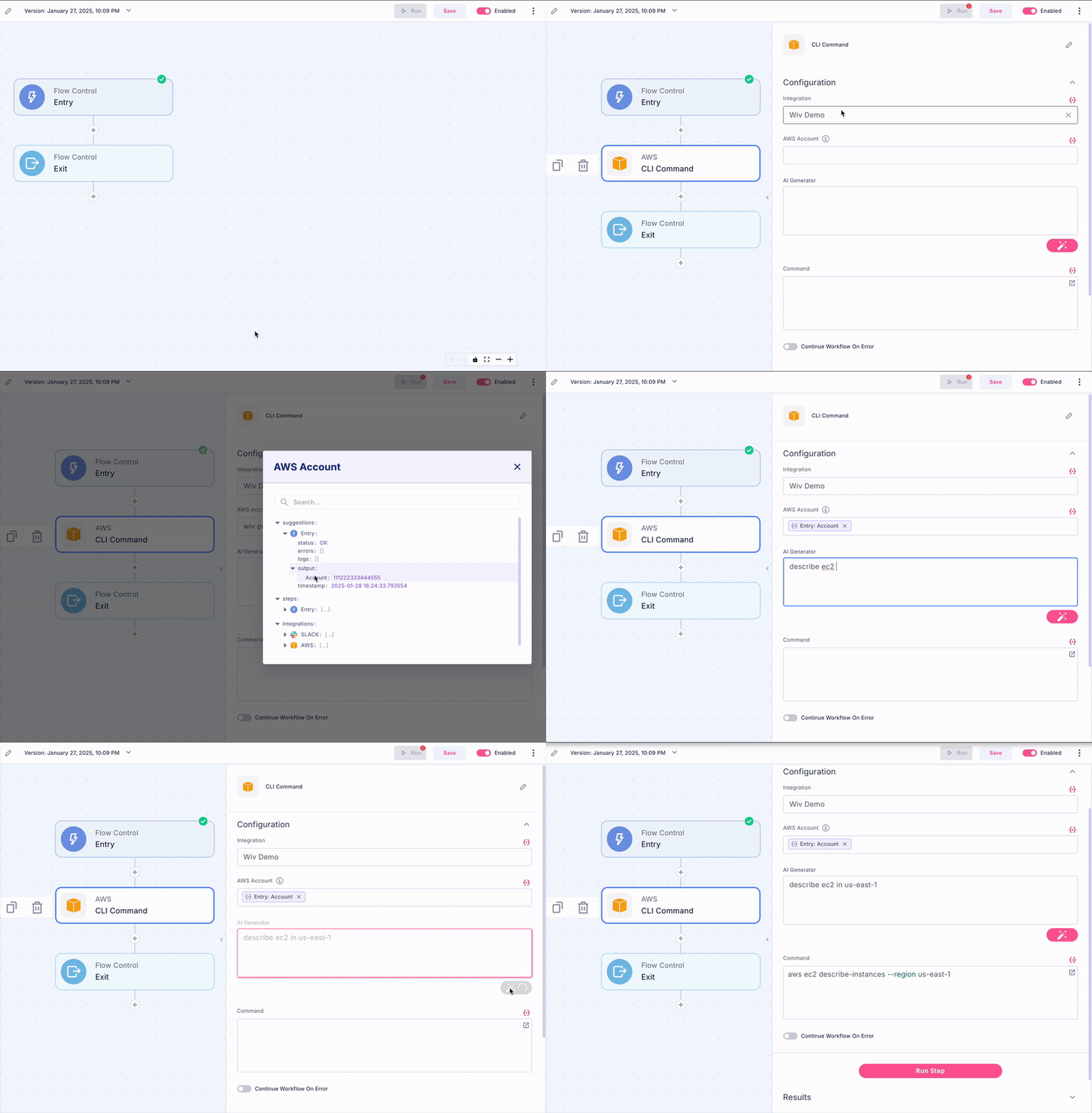
Explicit region specification required for a single CLI command (e.g.,
--region us-east-1) - Commands must follow AWS CLI syntax and structure
- Error messages can be fed back to AI for correction and optimization
- Region-specific service availability must be considered
Regular CLI Command Usage
Basic Operation
- Add an AWS CLI step to your workflow
- Select your AWS integration from available options
- Specify the target account (optional, defaults to payer account)
- Input your AWS CLI command with required parameters
- Configure error handling preferences and timeout settings
Multi-Account CLI Command
Key Features
- Automated Multi-Account, Multi-Region Execution
- Automatically runs commands across all accounts in the payer organization
- Handles regional iteration automatically without additional coding
- Consolidates results into a single, easily processable list
- Optimizes execution time through parallel processing where possible
- Enhanced Result Data
-
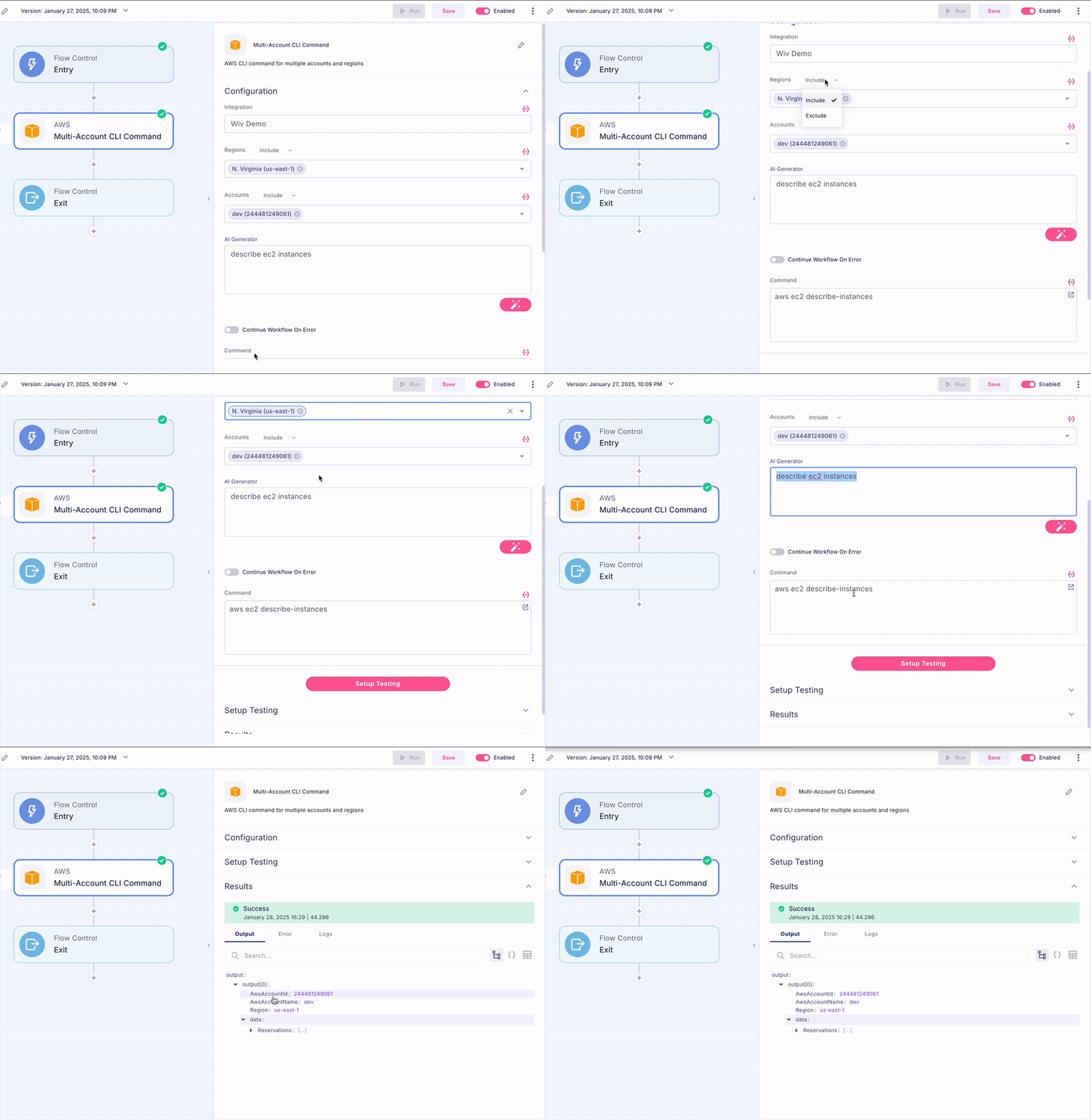
Adds three essential fields to each result:
AwsAccountId: Unique identifier for the source accountAwsAccountName: Human-readable account identifierRegion: AWS region where the resource was founddata: The original CLI response from AWS
- Maintains all original AWS CLI command output fields
- Standardizes output format for easier downstream processing
- Simplified Workflow Structure
- Eliminates need for nested loops and complex iteration logic
- Improves code readability and maintainability
- Streamlines result processing with consistent data structure
- Reduces potential for errors in multi-account operations
Configuration Options
- Account Filtering
- Option to target specific accounts by ID or name
- Support for pattern matching in account selection
- Ability to exclude specific accounts from execution
- Region Filtering
- Specify target regions individually or by pattern
- Exclude specific regions from execution
- Support for region groups (e.g., all US regions)
- Error Handling
- Toggle for error isolation between accounts and regions
- Continues execution despite regional failures
- Detailed error reporting per account and region
- Configurable retry logic for transient failures
Implementation Steps
- Add a Multi-Account CLI Command step to your workflow
- Input your AWS CLI command
- Configure account and region filters (optional)
- Set error handling preferences and timeout thresholds
- Configure output formatting options (optional)
- Execute workflow and monitor progress
Example Use Cases
Best Practices
When to Use Regular CLI
- Single account operations requiring specific permissions
- Complex command structures with custom query parameters
- Non-list/describe commands (e.g., modify, create, delete operations)
- Account-specific administrative tasks
- Time-sensitive operations requiring immediate execution
When to Use Multi-Account CLI
- Organization-wide resource discovery and inventory
- Compliance checks across multiple accounts
- Resource utilization analysis and optimization
- Cost optimization initiatives and reporting
- Security posture assessment
- Cross-account resource relationship mapping
Support and Troubleshooting
- AI-powered command generation and optimization available
- Support team assistance for setup and execution challenges
- Error analysis and correction through AI interface
- Documentation for common error patterns and solutions
- Best practices guides for specific use cases
Limitations and Considerations
- Regular CLI
- Requires explicit region specification in commands
- Single account context per execution
- Command timeout limitations
- Service quotas and API rate limits apply
- Region-specific service availability
- Multi-Account CLI
- Limited to describe/list commands returning list format results
- Additional processing time for multi-account operations
- Organization-level IAM permissions required